
How to Track Breeding
Record breedings, pregnancies, and offspring lineage.
How to Track Breeding
Breeding records link a sire and dam to expected and actual offspring, building a lineage you can query later.
Start a breeding record
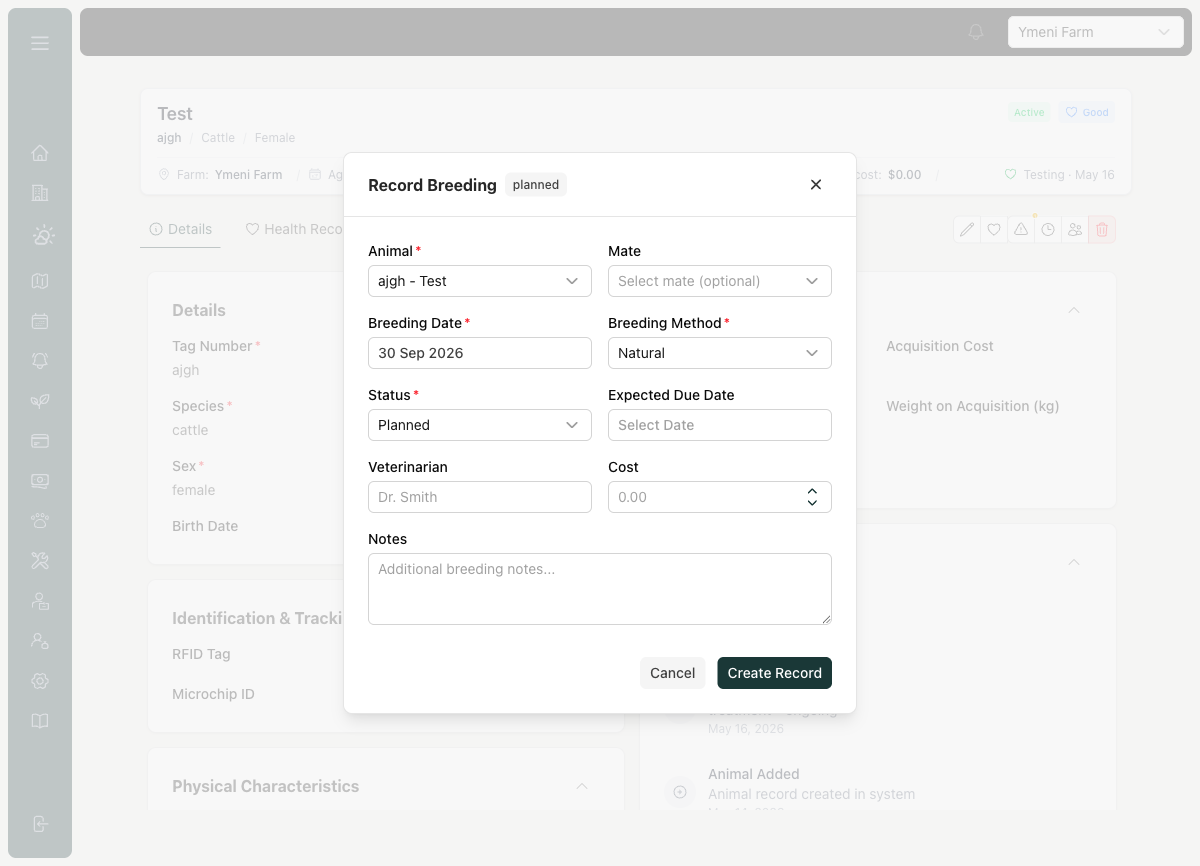
- Open the female animal's detail page.
- Click Add Breeding (or use the Breeding action).
- Fill in:
- Sire — pick the male from your animals list, or enter an external sire (purchased semen, neighbor's bull, etc.).
- Breeding date — required.
- Method — natural, artificial insemination, embryo transfer.
- Expected due date — auto-calculated from species gestation, editable.
- Notes — optional.
- Save.
Update the record
As the cycle progresses, edit the record to add:
- Pregnancy confirmation — date and method (palpation, ultrasound, etc.).
- Lost pregnancy — date and reason (sets status to failed).
- Birth outcome — actual birth date, number of offspring, complications.
Register offspring
When offspring are born:
- From the breeding record, click Register Offspring.
- For each newborn:
- Tag / identifier
- Sex
- Weight at birth
- Status (live, stillborn)
- Save.
Each offspring becomes its own animal record, with the dam and sire pre-filled in its parentage. The breeding record links to all offspring.
View lineage
From any animal:
- Parents — visible on the identification card.
- Offspring — listed on the activity card.
- Breeding history — tab on the animal detail page.
See also
- How to Manage Animals
- How to Log Health Records — record pregnancy checks as health records.