
How to Log Health Records
Record vaccinations, treatments, and observations on the health timeline.
How to Log Health Records
Health records track every vaccination, treatment, illness, and routine check for an animal. They feed the timeline, reminders, and dashboard health widgets.
Open the health view
From an animal's detail page, open the Health tab. You'll see:
- Overview card — current status, last visit, open treatments.
- Timeline — chronological list of all records.
- Reminders — upcoming vaccinations or follow-ups.
- Calendar — month view of past and scheduled records.
Add a health record
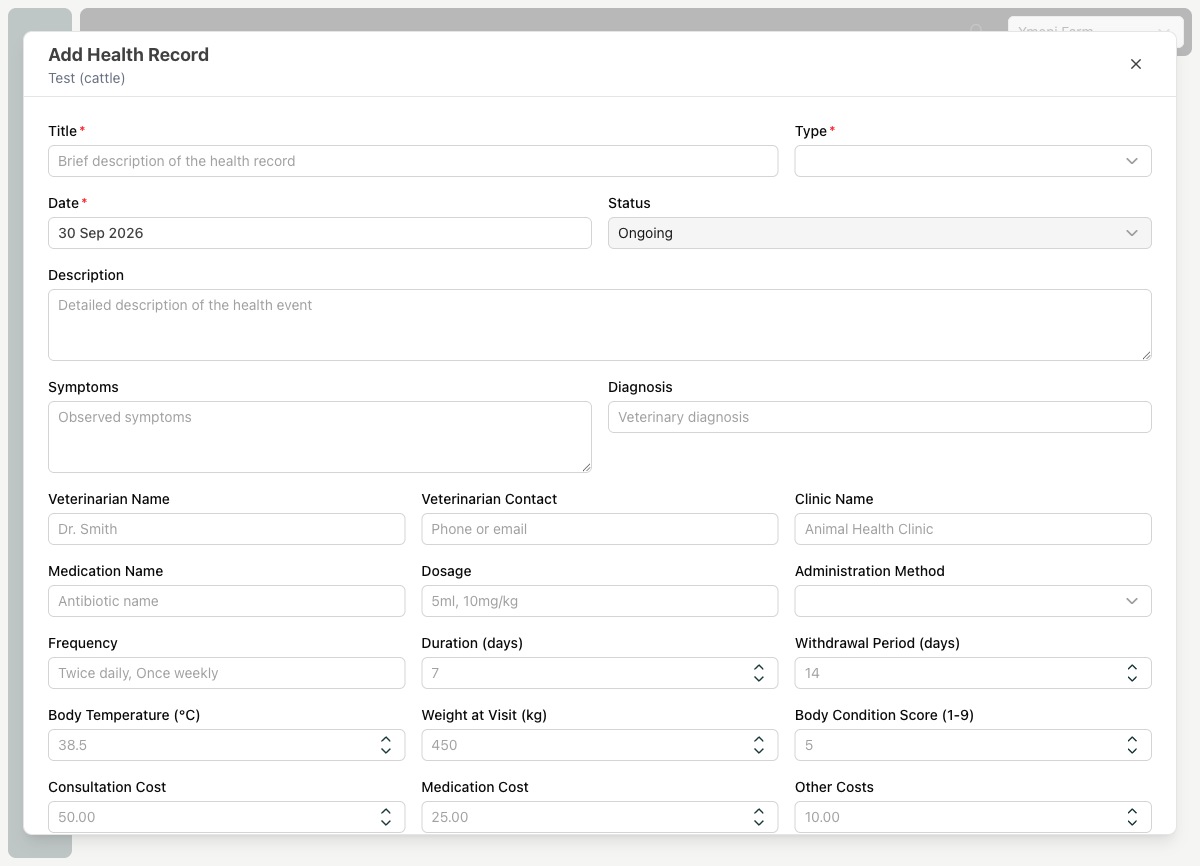
- Click Add Record (or Log Health action).
- Select Record Type:
- Vaccination — vaccine name, batch, dose, next-due date.
- Treatment — diagnosis, medication, dosage, duration.
- Check-up — routine observation, weight, temperature.
- Illness — symptoms, severity, status (open / resolved).
- Injury — description, severity, treatment.
- Fill in:
- Date — when it occurred (required).
- Notes — free-text observations.
- Vet / handler — who performed it.
- Cost — optional; flows to transactions if linked.
- Save.
Filter the timeline
Use Health Records Filters to narrow by:
- Record type
- Date range
- Status (open / resolved)
- Vet
Reminders
When you set a next-due date (e.g. on a vaccination), it appears in:
- The animal's Reminders card.
- The dashboard Health widget.
- The schedule calendar.
Mark reminders complete by logging the follow-up record.
Resolve an illness or injury
Open the record from the timeline and change status to resolved. The resolution date is captured automatically.
See also
- How to Manage Animals
- Glossary — event vs. health record distinction.